01 · Scope
What partners are being asked to test
Each partner organisation nominates one colleague to create and personally play two learning routes with Cassie: a linear route for knowledge transmission and an adaptive route for identifying and filling knowledge gaps.
The focus is the AI-supported creation and playback experience: Cassie’s use of the source and audience profile; estimated versus actual output; Guido’s guidance for the latest unresolved learning unit; and Rava’s explanation.
The pre-existing adaptive routing engine is not being retested. Do not create a separate test for level-up/down rules, skip thresholds or adaptive regression. Play the adaptive route as configured and record only unexpected behaviour you encounter.
02 · Access
Open these resources before you begin
Read this guide and both report forms first. Your Google account opens the forms; your EduBot system sign-in is separate.
Teacher manual links
Record results in the matching Google Form: one report for the linear route and one for the adaptive route. Use the comments/evidence fields when more explanation is needed. Do not assume a particular form section, upload limit, draft-saving or edit-after-submission behaviour.
03 · Expected behaviour
Know what each AI agent should do
Cassie · Source-based generation
Builds the route from the source and intended audience.
Cassie uses the uploaded source plus the intended audience’s age, prior knowledge, language and attention window. The age profile is for learners—not the adult tester. It summarises the source, creates PDFs suited to the attention window, and uses each PDF to begin a learning block with several difficulty levels and 2–4 related interactive learning units.
Source length and attention window influence the volume. A requested number is only a preference: Cassie’s prompts, source length and audience characteristics govern the final organisation. Judge quantity and content quality separately, and compare the first output against an estimate recorded before generation.
Guido · Guidance Agent
Guides the learner after the first error—without giving the answer.
After a first incorrect answer, Guido should use the latest answer and state, focus on the learning unit just failed, and ask questions that lead toward a concrete solution in language appropriate for the stated audience. The same learning unit must be available for another attempt afterwards.
Guido must not revive an older learning unit that has already been solved on a second attempt or explained by Rava. A clearly labelled teaching reference to earlier material is acceptable; treating an old unit as the current unresolved problem is not.
Rava · Reveal Agent
Explains the current solution after a repeated error.
After another incorrect answer on the repeated learning unit, Rava should provide the correct solution and explain why it is correct in simple, concrete language for the stated age and prior knowledge. It must address the current learning unit.
After Rava, the learner continues: to the next learning unit in linear mode, or to a lower level in adaptive mode.
04 · Workflow
A nine-step route for each test
Complete Steps 1–2 once. Repeat Steps 3–9 for each route; keep route names and reports distinct. You may use the same learning group for both routes.
-
01Once
Prepare
Log in or register to the EduBot solution
Open the content-creation testing link. Use existing access, or select Registration if needed. The teacher manual covers username, password, email address and preferred language. Use the testing deployment—not an unrelated registration example.
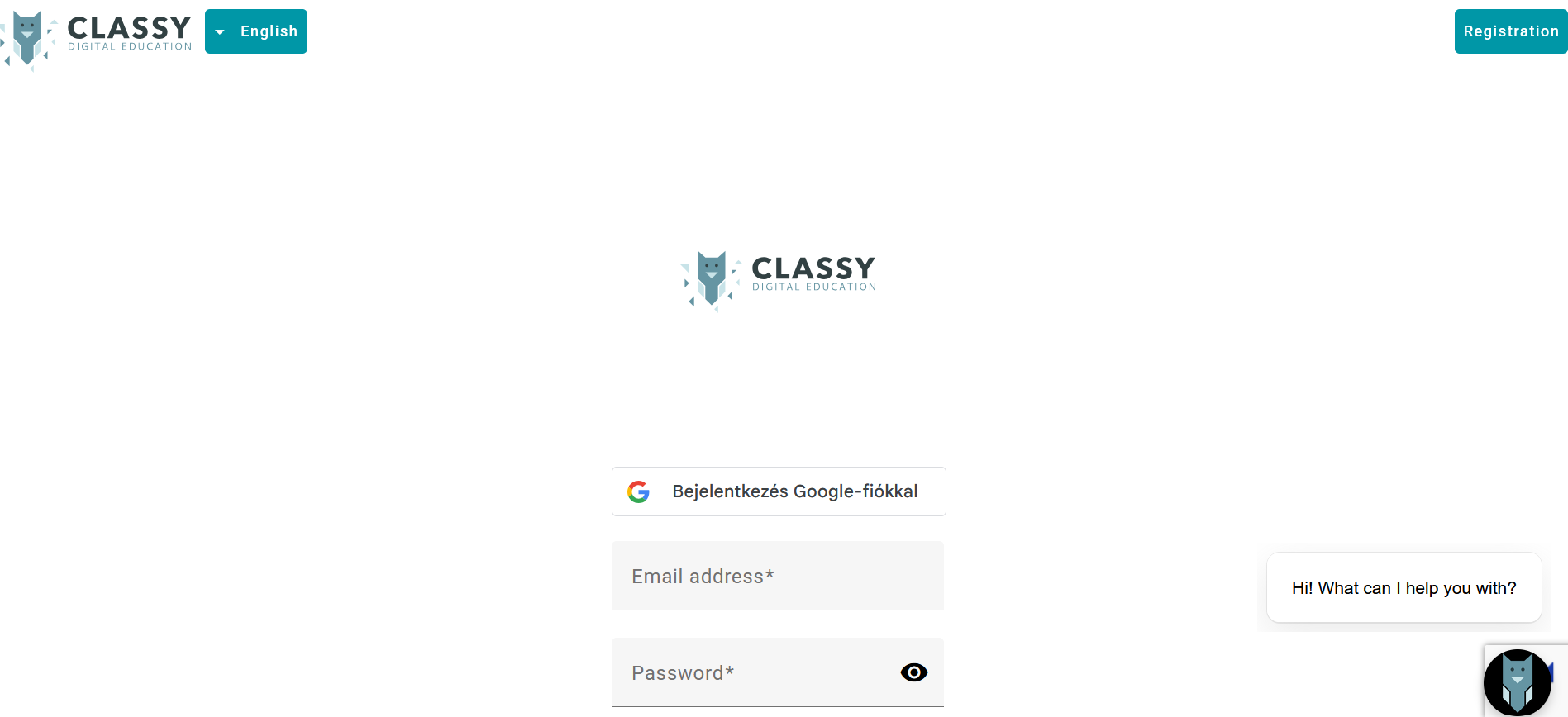
Testing login / registration entry point -
02Once
Prepare
Create one identifiable learning group
Go to For teachers → Groups → Create new. Use a name such as
WP3 — [organisation] — [date], select the group language, complete basic settings and save. Record the group name in both reports. Use it for your own student-app playback; do not invite additional learner-testers.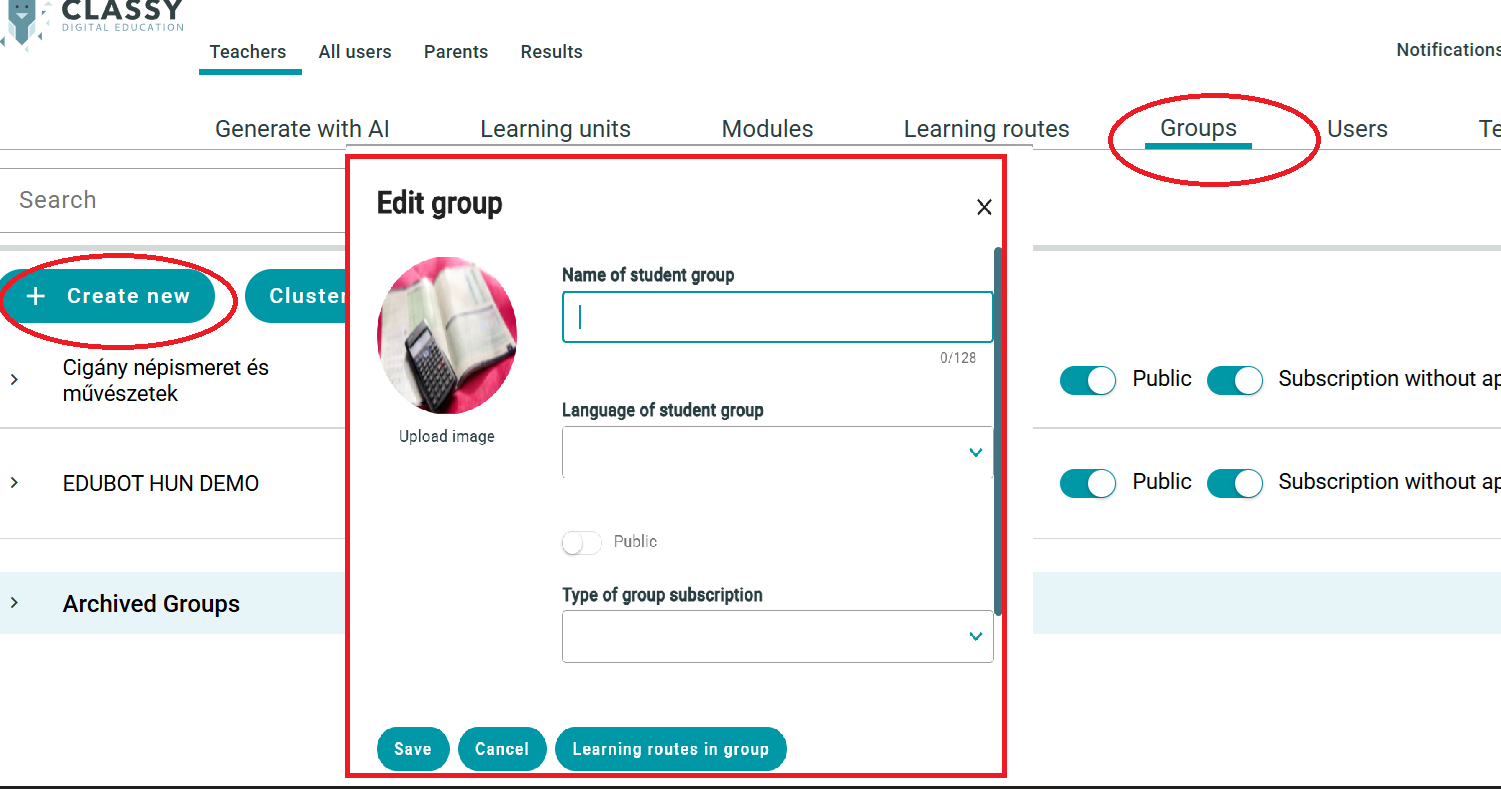
Creating a group and setting its language -
03Record first
For each route
Select the source, profile the audience, estimate output
In Generate with AI, choose a source PDF whose subject you can check. A short text of a few pages is more useful for this basic-function test than a whole book. Record its title, length/page count and subject; then state intended age, prior knowledge, language and attention window.
Before generation, write down:- Likely PDF / interactive output volume and learning length—use a range where honest.
- Why: source density and audience reading time.
- Whether the two routes use the same source/profile or different ones.
Do not reconstruct your estimate after seeing the generated route. Do not demand a preset count from Cassie.
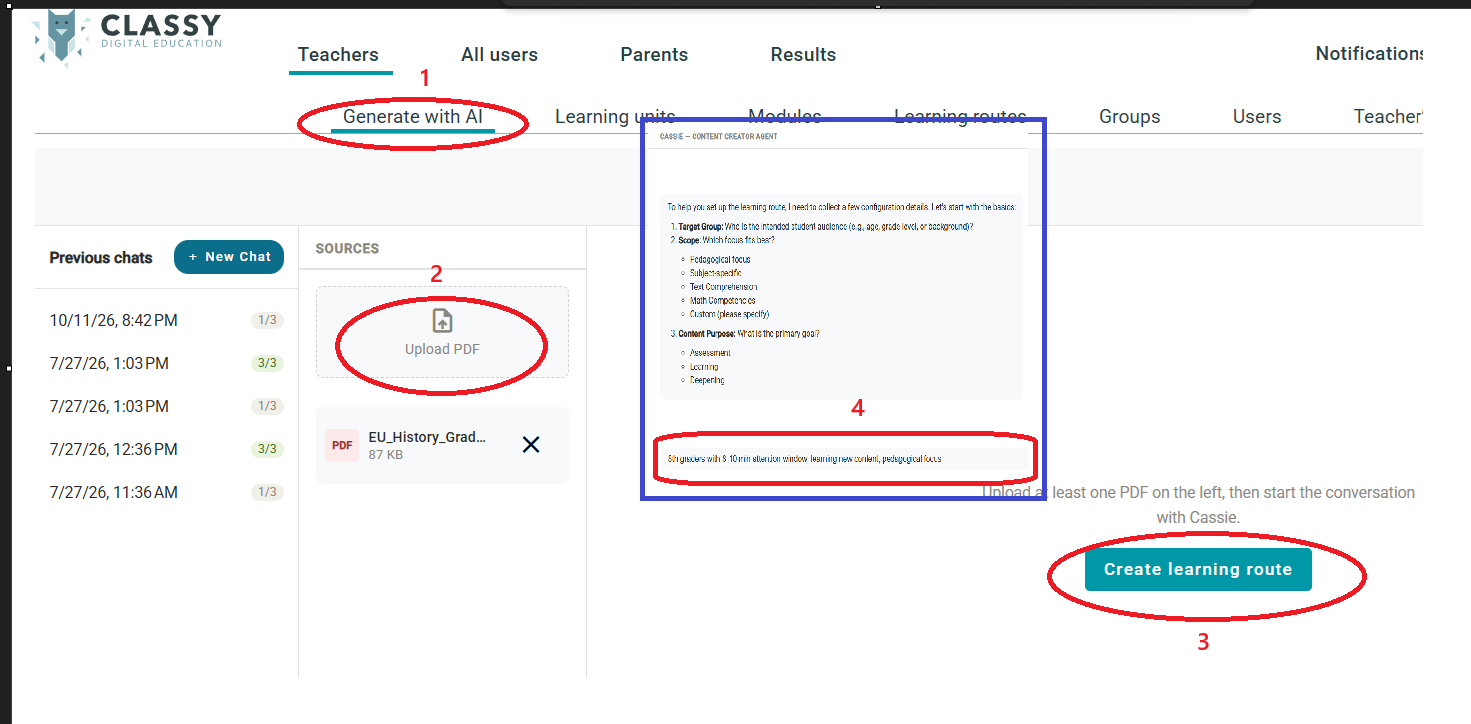
Starting an AI-generated learning route -
04Evidence before edits
For each route
Create the route with Cassie
Upload the PDF under Generate with AI, answer intake questions as presented, and name the correct purpose and route type. In both routes, each generated PDF begins a learning block with difficulty levels and interactive learning units.
Template 1 · LinearCreate a linear learning route for knowledge transmission from this PDF for [age] learners with [prior knowledge], in [language], with an attention window of [window]. Use Test with feedback mode with student-side agents enabled.
Template 2 · AdaptiveCreate an adaptive learning route for identifying and filling knowledge gaps from this PDF for [age] learners with [prior knowledge], in [language], with an attention window of [window]. Use Test with feedback mode with student-side agents enabled.
Record the first output before changing anything.Before regeneration or deletion, capture the first PDFs and the first interactive output. You may ask Cassie to regenerate or delete redundant generated content, but you cannot manually edit it at this stage. Retain the original source PDF. Record requested changes, every removed generated PDF and why, then record the final deployed content separately.
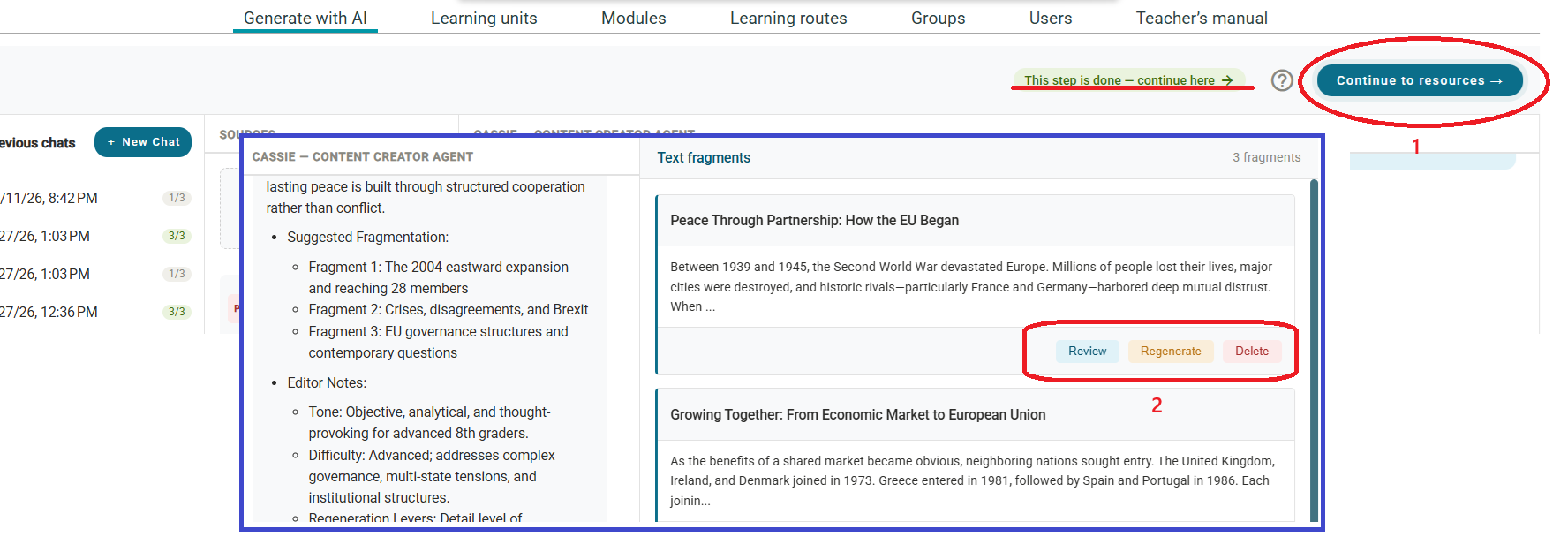
Review initial generation 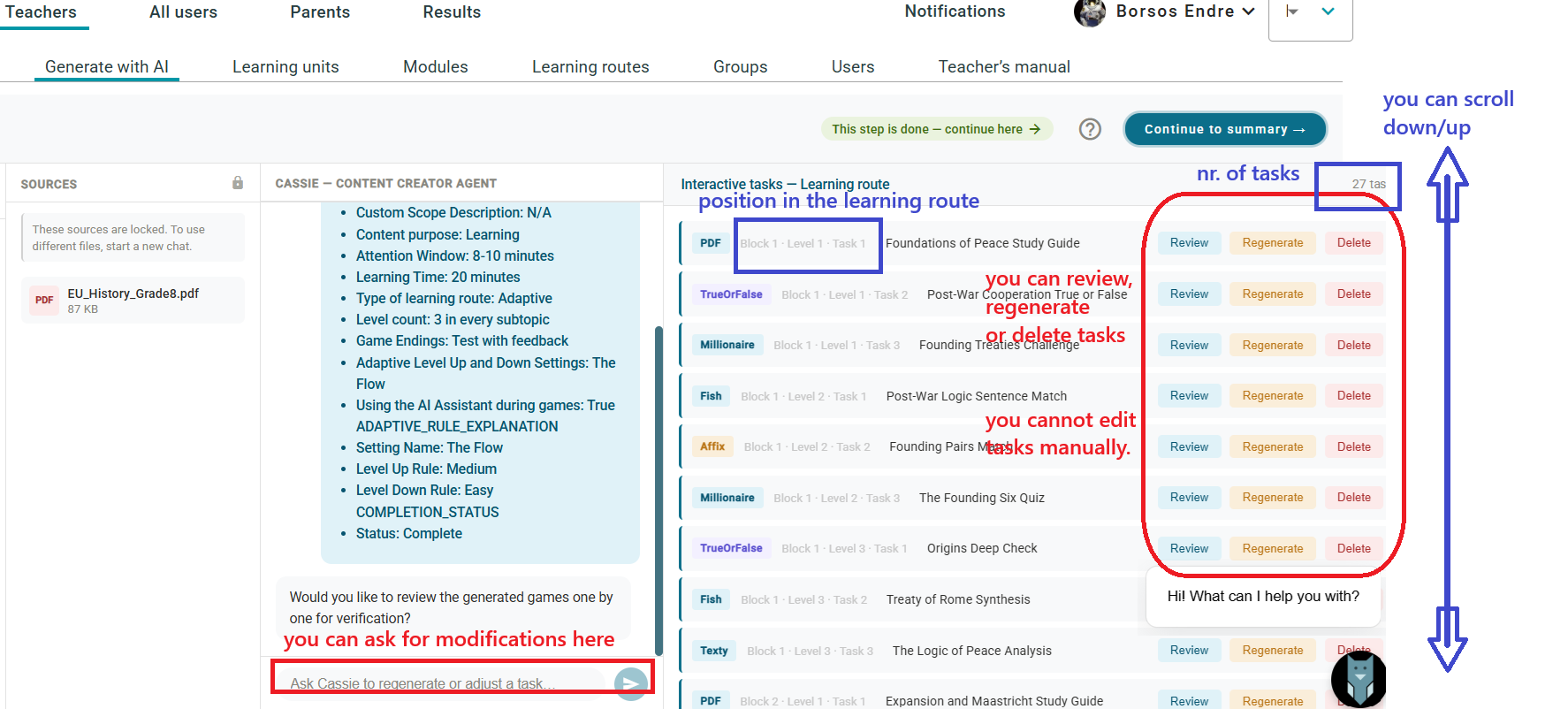
Check generated PDFs 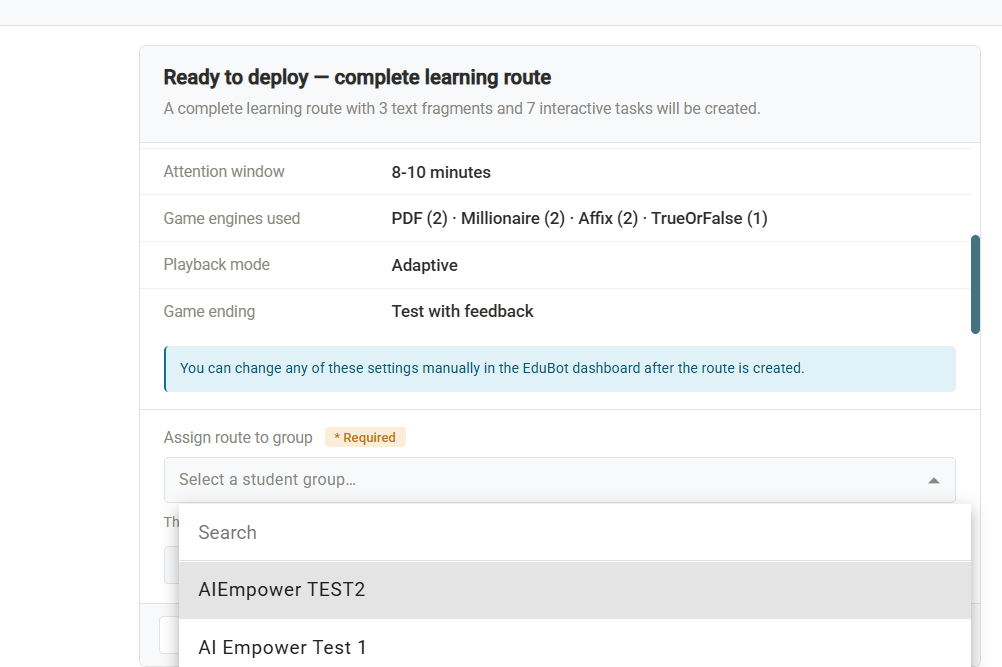
Review interactive units 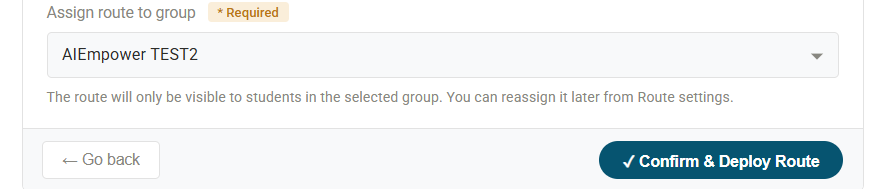
Select the group and confirm deployment 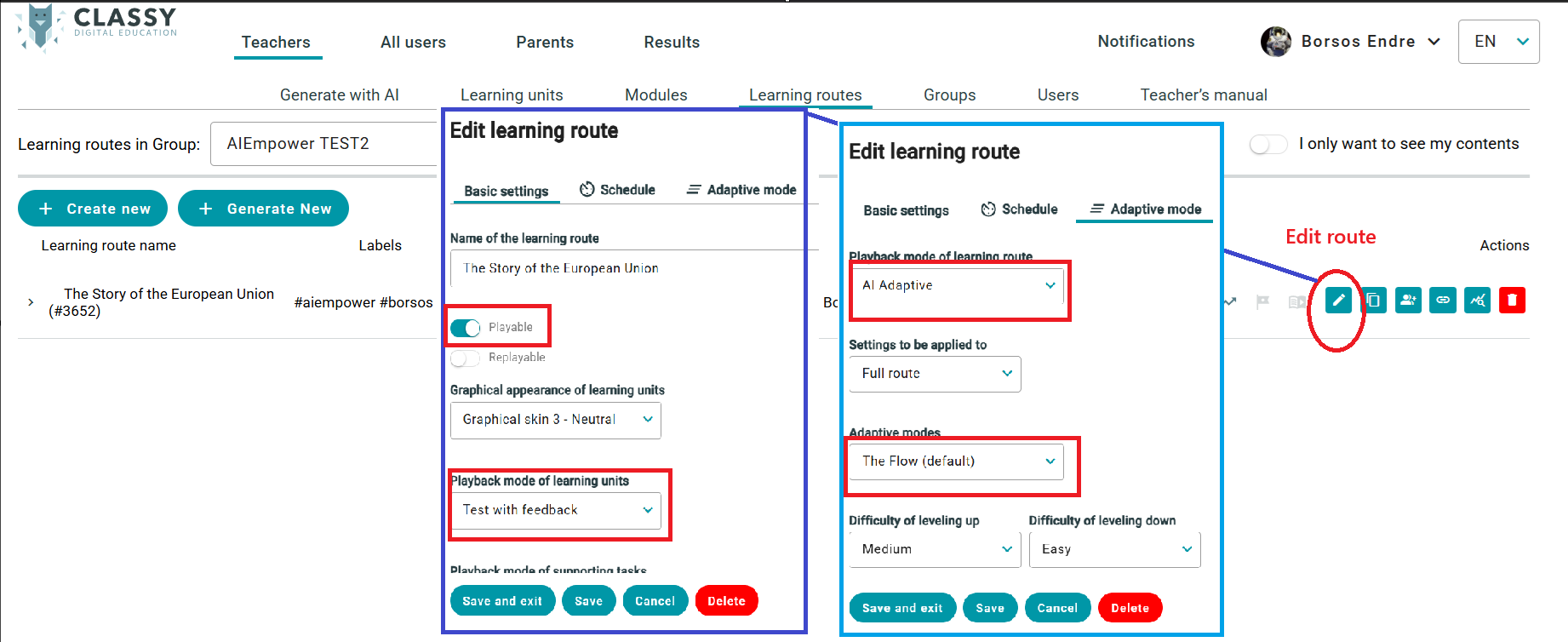
Route settings can be reviewed before playback -
05Judge, don’t guess
For each route
Compare actual output with your estimate
Use the first output recorded in Step 4. Mark the result close enough, not close enough or uncertain, and explain why. Check source coverage, PDF length/readability and suitability for the stated audience and attention window. Record generation changes separately from this first-result comparison.
“I asked for a 20-minute learning route and got 27 learning units in three blocks, each with three levels. I judged this too large and deleted redundant units, keeping three PDFs and nine tasks.”
-
06Fix and record
For each route
Check saved route settings
Go to For teachers → Learning routes, select the group, choose Edit on the relevant route, and verify settings. Record any difference before manually correcting it; then save, exit and reopen to confirm the values persisted.
Setting Linear report · Template 1 Adaptive report · Template 2 Route playable Yes Yes Learning unit playback Test with feedback Test with feedback Route playback mode Linear AI Adaptive Adaptive preset — The Flow (default) Record whether Cassie or you set/changed each value. In the teacher route list, click Link, paste the generated playable link into the matching report, and retain the route name/ID.
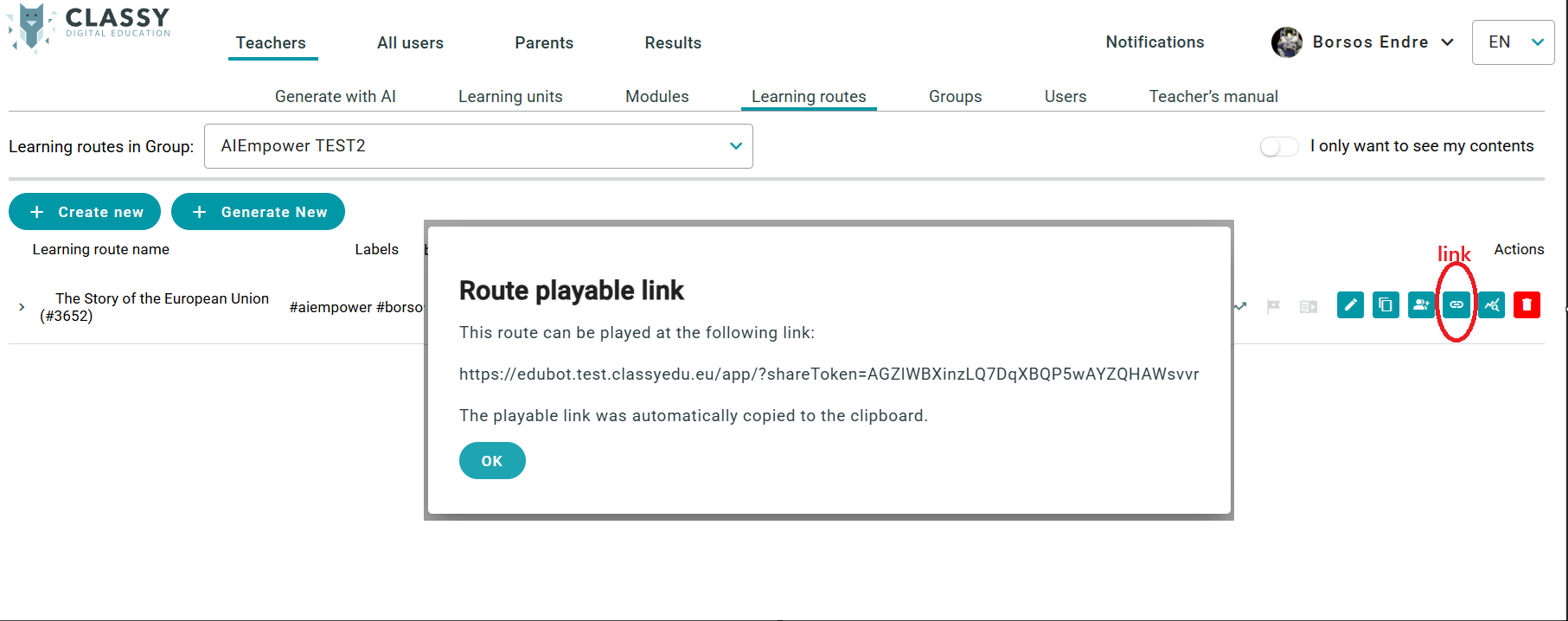
Capture the generated route link, route name and ID -
07Same tester
For each route
Open the student app and enter your group
Open the student app and sign in with your testing access. You can also reach it from the EduBot solution under All users. Select your test group and the route you created. Use signed-in, group-based playback—not the guest route link obtained in Step 6.
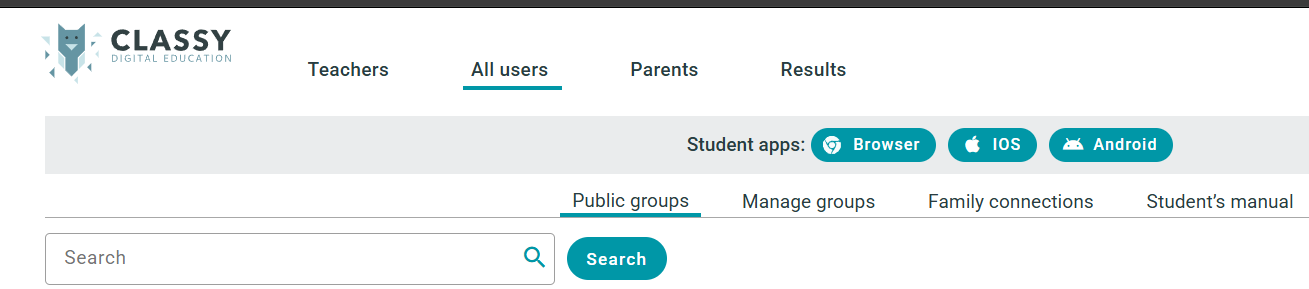
Student app access 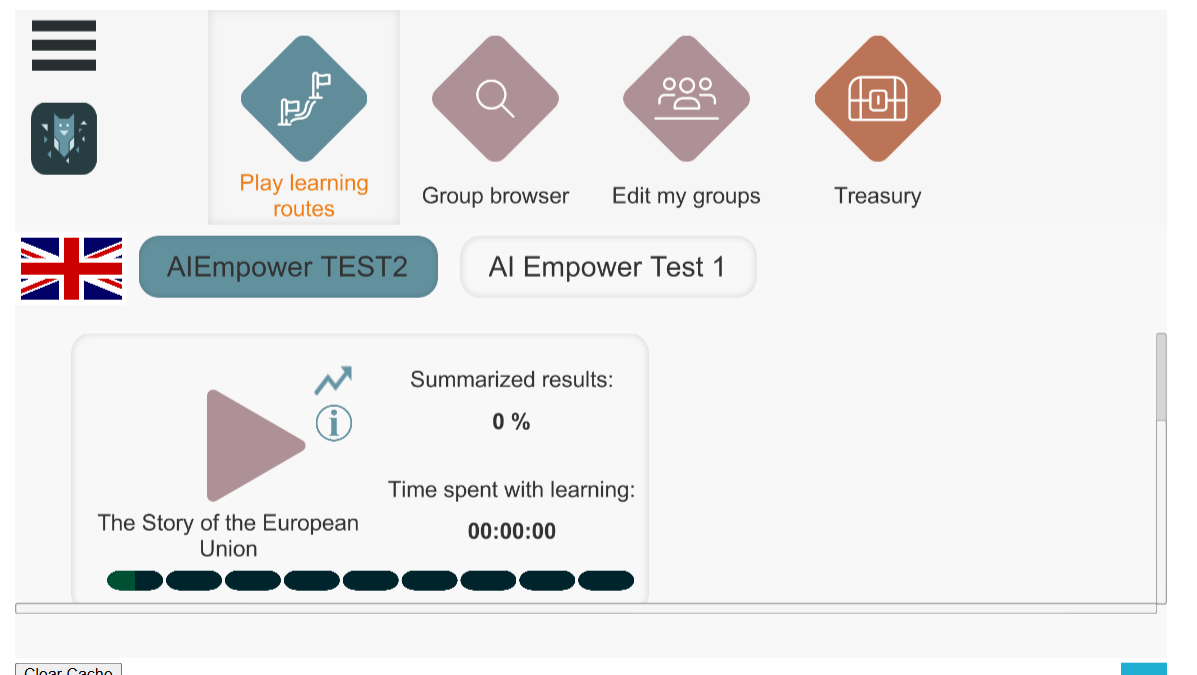
Select your test group 
Open the assigned route -
08Deliberate inputs
For each route
Play, observe feedback, Guido and Rava
Follow the route, including any PDF-reading learning units you retained. Reading a PDF is not an answer attempt. Use deliberate incorrect answers as functional test inputs—not a measurement of your competence. Record the current learning unit, answer submitted, feedback and agent exchange as they occur.
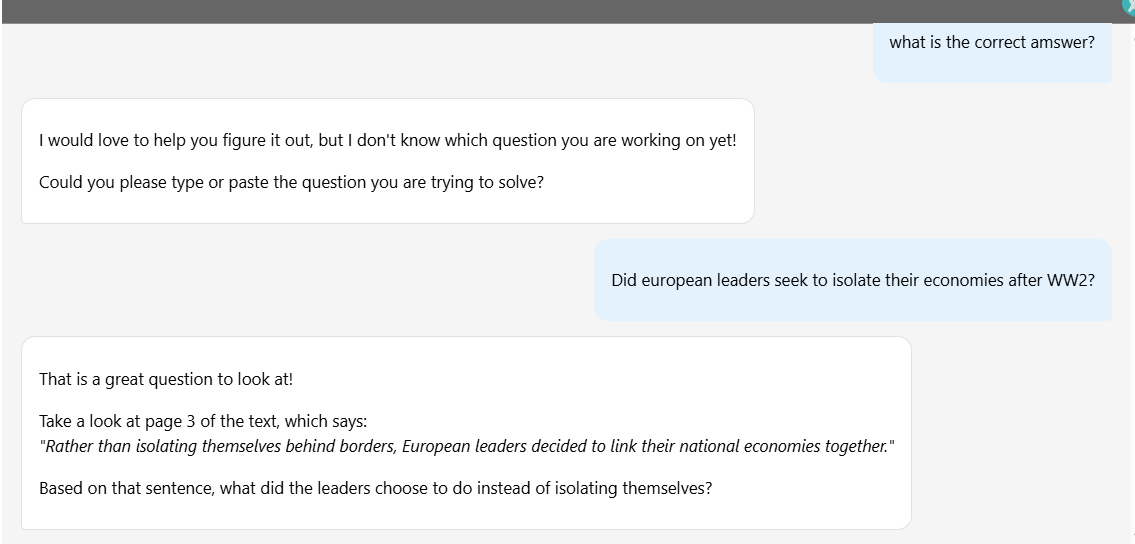
Recognise agents by stage and behaviour.They do not yet reliably identify themselves by name. Guido should guide without directly revealing the answer; Rava should reveal and explain it after the repeated error. Leave either conversation with the X in the upper-right. After Guido, retry the same unit; after Rava, continue as expected for linear/adaptive mode.
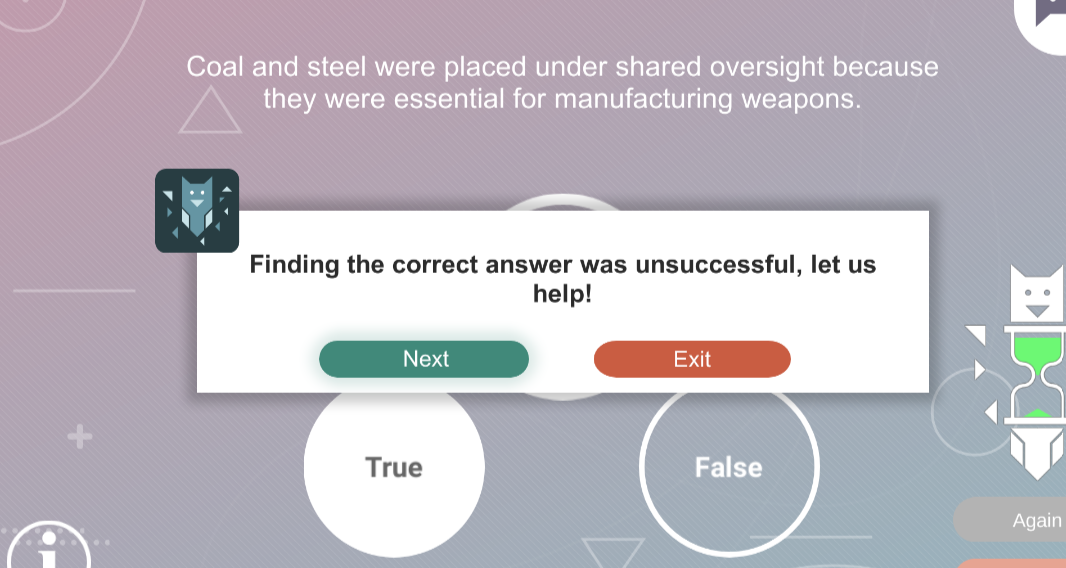
Deliberate first error: guidance should follow -
09Submit both
For each route
Record completion and submit the matching report
Record the route-end state—or where and why you stopped. Complete the appropriate Google Form, supplying the source PDF, screenshots and relevant Cassie/Guido/Rava conversation evidence requested there. Include your pre-generation estimate and comparison, actual saved settings, unexpected behaviour and any observation you could not execute.
If a required step fails, explain the failure rather than implying success. Follow the form’s upload instructions, check the submission confirmation, and if access or upload blocks submission, retain evidence and notify the person who sent the testing request.
05 · Playback observations
Run these four AI-agent observations in both route types
These are agent/content observations in two playback contexts—not adaptive-routing acceptance tests. Keep B, C and later D in the same session where possible. If suitable learning units do not appear, report what could not be made; do not force another adaptive path or mark an unexecuted case PASS.
Correct first attempt
Answer an interactive learning unit correctly. Record feedback and normal continuation. Guido and Rava should not be unnecessarily triggered.
First error → Guido → correct retry
Answer a different unit incorrectly. Confirm Guido addresses the latest unresolved unit; ask for help long enough to assess whether questions guide toward a concrete solution. Return to the same unit, answer correctly, and record guidance, retry and state.
Repeated error → Rava
On another unit, answer incorrectly, receive Guido guidance, retry the same unit and answer incorrectly again. Capture Rava’s correct solution/explanation. Judge its simplicity, accuracy and fit for the stated audience; record what happens next.
Later Guido: no old-unit revival
After B has been solved and C explained, answer a later unit incorrectly. Guido should focus on that latest failed unit—not revive B or C. Capture the opening/follow-up questions, current unit identity and proof of the earlier states.
If Guido asks the tester to paste the question because it does not know which unit is open, record that as a context failure. Guidance after the tester manually supplies the question is a workaround—not proof that initial context handling succeeded.
06 · Final record
What a useful report must contain
Use the matching Google Form as the primary report. A useful report permits a colleague to understand the setup, judge the evidence, and reproduce a problem.
- 01Tester, organisation, group, route name/ID, source and intended audience profile.
- 02Pre-generation human estimate, actual PDF/interactive output and reasoned closeness judgement.
- 03Saved route type, Test with feedback and agents-enabled settings—including manual changes.
- 04Current learning unit, submitted answers, feedback, plus relevant Cassie/Guido/Rava exchanges—not merely “AI helped”.
- 05Completion state, unexpected behaviour, reproduction steps and observations not executed.


Funded by the European Union. Views and opinions expressed are however those of the author(s) only and do not necessarily reflect those of the European Union or Tempus Public Foundation. Neither the European Union nor the granting authority can be held responsible for them.